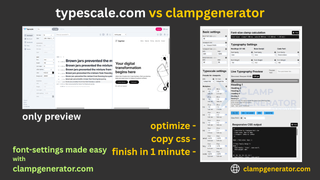
If yo’ve already checked our Best Font-Size Clamp Generators, you know tools like ClampGenerator.com and Utopia.fyi are excellent for creating fluid typography with clamp(). But what about more visual, UI-focused tools like Typescale.com?
Here’s a clear comparison to help you choose the best fit for your responsive design workflow — and, if you’re specifically hunting for a Typescale.com alternative that outputs real clamp() CSS instead of static rem previews, why ClampGenerator is the one to try.
🏆 ClampGenerator.com — Developer-Friendly Typescale Generator with clamp()
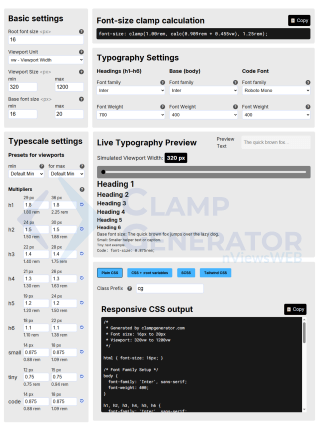
ClampGenerator’s font-size typescale generator gives you total control to create fluid, production-ready typography systems using the CSS clamp() function. It’s tailored for developers and advanced designers.
🔧 Key Features:
- Define base font size and custom viewport range
- Assign typescale multipliers per element (
h1-h6,small,code) - Configure font family & weight for each element
- Simulate responsive viewport scaling live
- Output CSS, Tailwind, SCSS, or root variables
- Offline support and copy-paste ready CSS output
🔗 Also explore: Layout Spacing Clamp Generator for margins, padding, and gap.
📌 Verdict:
The most flexible and accurate tool for creating a complete, responsive font-size system with clamp.
🎨 Typescale.com — A Beautiful Visual-First Experience
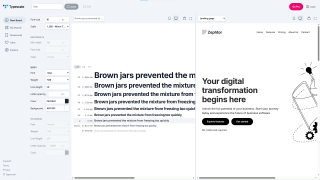
Typescale.com is a polished online tool aimed at UI/UX designers. Its main strength lies in live heading previews with customizable weights, spacing, and font settings — visually ideal, but limited in responsive logic.
✅ Good for:
- Design prototyping and previewing on desktop/tablet/mobile
- Basic scale setup using REM or PX
- Font customization for presentations
❌ Not ideal for:
- Responsive fluid scaling using
clamp() - CSS variable or SCSS/Tailwind output
- Real-time testing in fluid web design
📌 Verdict:
Great for early-stage design drafts, but lacks the development tools needed for scalable, responsive typography in production.
🆚 Feature Comparison: ClampGenerator.com vs Typescale.com
| Feature | ClampGenerator.com ✅ | Typescale.com ❌ |
|---|---|---|
| Clamp() Output | ✅ Yes | ❌ No |
| Font-size & Typescale Support | ✅ Yes | ✅ Yes |
| Viewport Unit Support (vw, vi, etc.) | ✅ Yes | ❌ No |
| Typescale Multiplier per Element | ✅ Yes | ❌ Global Only |
| Responsive Viewport Simulation | ✅ Yes | ❌ No |
<small>, <code> Element Support |
✅ Yes | ❌ No |
| Font Family & Weight Per Element | ✅ Yes | ✅ Body Only |
| Line-height Support | 🔄 Coming Soon | ✅ Yes |
| CSS / Tailwind / SCSS Export | ✅ Full | ❌ Not Available |
| Offline Access (PWA) | ✅ Yes | ❌ No |
| Visual Design Board | ❌ No | ✅ Yes (Pro) |
Best Typescale.com Alternative for Developers
If Typescale.com’s visual rem previews aren’t enough and you need production clamp() CSS, ClampGenerator is the most complete Typescale.com alternative available today. It covers everything Typescale.com does for previewing a heading scale, then goes further with fluid viewport-based scaling, per-element font-family and weight control, and CSS, CSS variable, SCSS, and Tailwind export — free, with no Pro plan gate on exports.
The same gap shows up in other popular type-scale tools people search for as Typescale.com alternatives, like Precise Type and Baseline’s Type Scale Generator — both produce clean, well-designed scales, but in fixed rem/px units rather than viewport-responsive clamp() values. If your scale needs to fluidly resize between a min and max viewport instead of jumping between fixed sizes, ClampGenerator is the one built for that.
Which Tool Should You Use?
-
✅ Use ClampGenerator.com if:
- You need production-ready
clamp()output - You want per-element customization
- You prefer CSS + Tailwind + SCSS options
- You work with real code, not just preview screens
- You need production-ready
-
🎨 Use Typescale.com if:
- You’re in the design exploration phase
- You need visual prototypes or quick heading previews
- You want to pitch a typography system to a client visually
Both tools serve distinct purposes. But if you’re building real websites with fluid, responsive typography, ClampGenerator.com gives you the complete toolkit — from design to code.
Both tools have their place. But if you’re ready to implement fluid responsive typography in code, ClampGenerator is the practical winner.
👉 Try ClampGenerator’s font-size typescale tool now